Skip to content

Akatori

Akatori
Platform
PC
Release Date
File Size
3.99 GB
Views
777
Patch Notes
2
Comments
0
Languages
English, Russian, French, German, Spanish - Spain, Traditional Chinese, Simplified Chinese, Korean, Portuguese - Brazil, Japanese
Added by
Download Game v1.0.04

Version Status

Current Version
v1.0.04
Current Build
24871085
Latest Build
24871085
Last Steam Update
+2 DLC Update Available v1.0.04
Included DLC
  • Akatori Soundtrack
  • Akatori - Digital Artbook

Screenshots

Akatori — Screenshots 1
Akatori — Screenshots 2
Akatori — Screenshots 3

Description

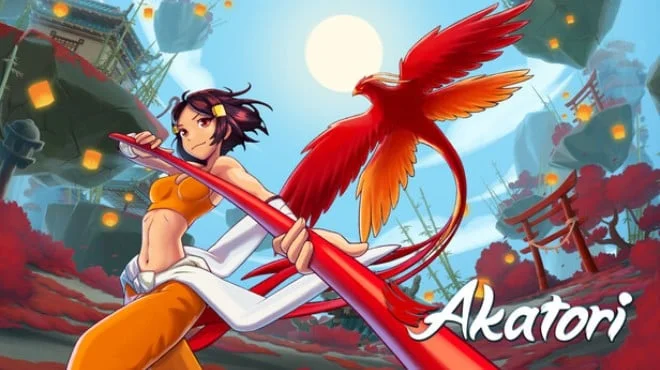
Akatori combines elements of a classic Metroidvania and a dynamic action platformer. According to the plot, a sinister entity has seized the power of the legendary Kohakujo the cradle of the gods and the source of truly boundless energy. Now our heroine, Mako, a disciple of the Firebird Temple, must embark on a captivating journey through worlds to find ancient deities and protect her homeland and the entire universe from an impending threat.

Throughout her journey, Mako will be accompanied by a mysterious scarlet bird sealed within a magical staff. This staff can both strike down enemies in combat and aid in exploring the surrounding world. The Akatori universe is quite diverse and includes over a dozen unique biome locations. Each has its own history, flora, fauna, and secrets. The player will not only explore these picturesque worlds with their amazing inhabitants, but also uncover numerous mysteries.

Of course, her journey will not be without challenges in the form of numerous enemies and dangerous bosses. The heroine will face over fifty different opponents along the way, as well as a dozen unique bosses with their own secrets and characteristics. She'll have to work hard to prevail against them.

System Requirements

Minimum

OS:
Windows 10 (64bit) version 21H1 (build 19043) or newer
Processor:
Intel Core i3-6100
RAM:
6 GB RAM
Graphics:
NVIDIA GeForce GT 740 DDR3 (2 GB)
Storage:
10 GB available space

Recommended

OS:
Windows 10 (64bit) version 21H1 (build 19043) or newer
Processor:
Intel Core i5-3470
RAM:
8 GB RAM
Graphics:
GeForce GTX 1050 (2GB) or Radeon R9 380 (2GB)
Storage:
10 GB available space

Installation Guide

Step-by-step setup process for RUNE

  1. Mount the .iso file in a virtual drive — on Windows 10/11 double-clicking the image is enough.

  2. Run the installer from the disc and install the game — the release is already cracked, so no manual file copying is required.

  3. Use the desktop shortcut created by the installer to start the game.

  4. If the game does not launch, copy the contents of the RUNE folder on the disc into the installed game folder and try again.

Game Info

Developer
Contrast Games
Platform
PC
Release Date
File Size
3.99 GB
Status
Scene (ISO)

Update Available

v1.0.04

Upgrade to v1.0.04 without re-downloading the full game

RUNE

  1. Base download Build 24555802 (upd.06.08.2026)

    You get this version with the full game download below

How to apply this update

  1. Download the update archive from the links in this section — it is much smaller than the full game, so the download will be quick.

  2. Extract the archive (RAR/ZIP) with WinRAR or 7-Zip to a short, Latin-only path like C:\Games\GameName.

  3. Run setup.exe inside the update folder and install the update into your existing game folder — the one that already holds the installed game. Do not install into a new folder.

  4. Copy the updated files included with the release and confirm replacement when prompted, then launch the game and check the new version in its main menu.

Download Game

The download below is the base version Build 24555802 (upd.06.08.2026). To reach v1.0.04, apply the updates in the chain above.

Full game 6

Download
akatori_build_24555802-rune
MD5: 5ad21b08424ca16afc8bf246bfc57636
SHA-256: fcdb3ffd8497f7f97311b9ed347bf9aa59576a8345ad02ca820d07b9a5ffeef0

Checksums verify the integrity of this specific file. They are not an absolute malware guarantee — always scan downloaded files.

Torrent file ready

MEGA
Akatori.v1.0.03.zip
PIXELDRAIN
Akatori.v1.0.03.zip
GOFILE
Akatori.v1.0.03.zip
MEDIAFIRE
Akatori.v1.0.03.zip
1FICHIER
Akatori.v1.0.03.zip

Patch Notes

Official changelists for the builds of this game

Akatori patch 1.0.04

Build 24871085

Hey everyone! We keep working on the game and we’ve prepared another patch with some bug fixes and changes. Thank you for staying with Akatori!

And here’s the patch note:

Changes


  1. Added button rebinding for gamepads.

  2. Significantly reduced the Mako's inertia in the air to improve maneuverability.

  3. Updated font for Traditional Chinese and Simplified Chinese to improve readability and normalize character sizes.

  4. Added tutorial for wall clinging in the "Amber Castle" location.

  5. Added air currents for easier return from the "Amber Castle" to the "Amber Forest".

  6. Changed the position of one of the flying mobs in the "Amber Castle" location.

  7. Moved the altar on the path to the detonator in the "Amber Castle" to make the level progression more comfortable.

  8. More prominent visual indication of the Serpent boss's kill box during the chase.


Bug Fixes

  1. If you repeatedly click the continue button at the moment of death in One Life mode, then upon entering another save slot, Mako will have the death animation.

  2. Top segment of the destructible wall on the first level of "Amber Plant" lacks lighting.

  3. Player input is blocked during quick transitions between scenes.

  4. The exit from the mini-boss Major Major's arena does NOT open if the player dies between killing the boss and picking up the key.

  5. If you minimize the game during the fade-out when transitioning between scenes or at any ambient switch point, then upon returning, the ambient of the previous scene will play on the new scene.

  6. The battle theme against the Serpent continues to play if the player Alt+Tabs during the transition from the death screen to the altar.

  7. The "Next" button on the credits skips the credits entirely.

  8. If after activating the Chaos bell you exit to another scene, return to the portal and hit it, the bell will activate over the portal, and after repeating, the portal's effects and UI will disappear.

  9. Fixed bugs with character display in Chinese localization.

  10. Fixed lighting for snowballs in the "Amber Plant" location.

  11. Fixed behavior of the Chaos bell in the "Amber Castle" location.

  12. Fixed gaps in level art across all locations.

  13. Fixed saving of difficulty selection in save slots.

  14. Minor text fixes.


And over 15 less noticeable changes :)


Source: Steam announcement SteamDB

Akatori 1.0.03 patch

Build 24821855

Changes

  1. Chaos potion now completely fills the chaos bar, rather than temporarily increasing its accumulation.

  2. Chaos bells have been moved from prominent locations to secret areas, except for the very first one in the Amber Castle.

  3. Chaos bell markers have been removed from the map.

  4. Kill zones in one of the Amber Castle levels and one of the Amber Forest levels have been replaced with non‑lethal ones.

  5. Difficulty and language settings have been combined into a single menu.

  6. Updated tutorial text for the "Glider" ability.

  7. Optimization of heavy baked lighting – now looks the same but takes up less space and puts less strain on the game.

  8. Visual improvements in the level art on the long snowy descent of the snow location.

Fixed Bugs

  1. Collectible icon does not appear if you close the game before saving at the altar.

  2. Collectibles collected on PC do not appear on another device.

  3. A collectible collected on the "One Chance" difficulty does not reset if you start a new game in the same save slot.

  4. Achievement for collecting all collectibles is awarded if you collect the same cat several times in one save slot by repeatedly restarting the game.

  5. Achievement for collectibles in the Monastery is awarded upon collecting the first collectible in two different save slots.

  6. Mako rises upward if you press against the wall to the left of the air current in the left part of the first snow level.

  7. Fixed spots where Mako cannot cling to the wall with the staff.

  8. The damage wave of the Bastion mob does not move by itself and only starts moving if Mako steps into it and starts moving in any direction.

  9. The

    Spoiler
    Serpent
    boss takes damage when Mako attacks the
    Spoiler
    Serpent
    during the transition to phase 2.

  10. Mako takes damage from the

    Spoiler
    Serpent’s tongue
    even when the
    Spoiler
    tongue
    visually does not hit Mako.

  11. If you kill the mini‑boss

    Spoiler
    Major Major
    and stand on his corpse, the weapon art overlaps Mako.

  12. Consumables in slots get shuffled after death, as the player set them. (Note: this is listed as a bug – intended behaviour is that they stay as arranged.)

  13. Exit from

    Spoiler
    Major Major's
    arena does NOT open if the player dies between killing the boss and picking up the key.

  14. If you change the language selection in settings, the difficulty selection remains in the initial language.

  15. If you minimize the game during the tutorial when receiving an ability (when the pop‑up window appears) and then return, the game will be paused, and after exiting pause the tutorial disappears.

  16. If during a cutscene with Japanese localization enabled you scroll to Portuguese, most of the Japanese characters in the dialogue disappear.

  17. Fixed several false texts.

  18. Removed a false transition at the beginning of the snow location, through which it was possible to unintentionally run to another level.


And over 20 more minor changes :)

Source: Steam announcement SteamDB

Reviews

4.5
out of 5
35 ratings 35 of these carried over from our archive

No written reviews for this game yet.

Rate this repack in the form below and your comment becomes the first review here.

Comments (0)

No comments yet. Be the first to leave one!

Leave a Comment

Rate this game
0 / 1000

Add a rating and your comment is published as a review too.

Please follow our community standards. Read the community rules

Similar Games